
OAuth 2.0 Authorization Code Flow w/ PKCE
This documentation outlines the OAuth 2.0 Authorization Code Flow with PKCE (Proof Key for Code Exchange). The Authorization Code Flow with PKCE ensures secure authorization for users and applications
Overview
What is OAuth 2.0?
OAuth 2.0 is an open standard for authorization that allows third-party applications secure access to user data stored on another service without sharing the user's password.
Instead of credentials, the third-party app gets an access token which it can use to make requests on behalf of the user.
OAuth has multiple flows, however the Developer Hub only supports the OAuth 2.0 Authorization Code Flow with PKCE, which is widely used by web apps, mobile apps, and APIs.
What is PKCE?
PKCE, which stands for Proof Key for Code Exchange, is a security enhancement of the OAuth 2.0 Authorization Code Flow,
especially when the client is a public client (such as mobile apps and single-page web applications) that cannot safely store a client secret.
PKCE adds an additional layer of security by using a code challenge and code verifier.
When the authorization code is sent, the client proves that it was the original requester by sending the correct code verifier.
This prevents attackers from intercepting and using the authorization code to gain access to the tokens.
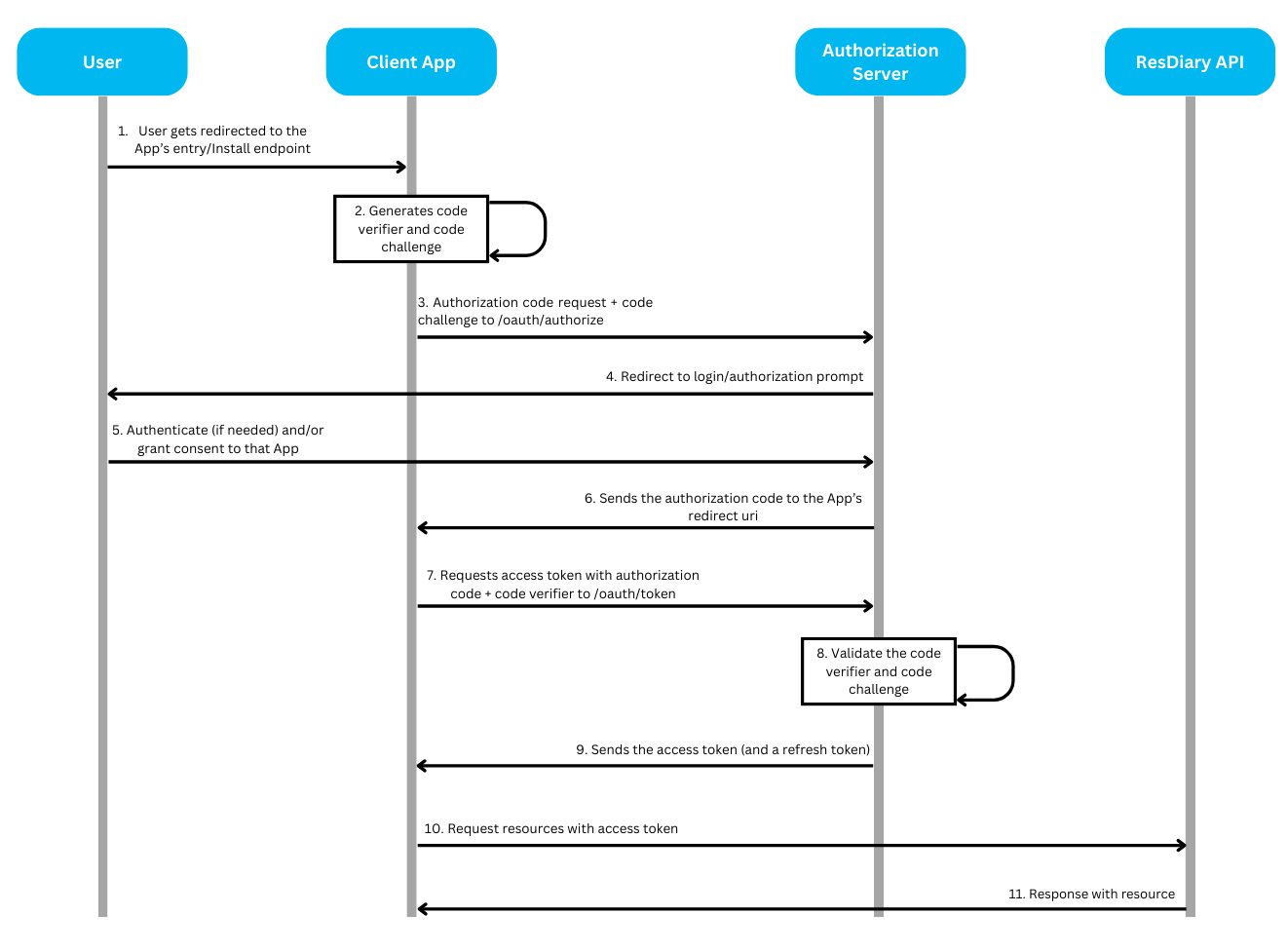
Quick Start
Prerequisites
Before implementing OAuth 2.0, you must have:
Your client credentials (client_id and client_secret)
An HTTPS-enabled redirect URI for your application
Understanding of the basic OAuth 2.0 concepts outlined below
Flow Overview
Preparation: Generate PKCE credentials
Authorization: Request authorization code from user
Token Exchange: Exchange authorization code for access token
Token Management: Refresh tokens when they expire
Implementation Guide
Phase 1: Preparation
Generate PKCE Credentials
To secure the authorization process, the client application generates a code verifier and code challenge.
Code Verifier:
The client generates a code verifier, which is a cryptographically random string (typically 43-128 characters long).
This code verifier is kept secret and is never transmitted over the network.
Code Challenge:
The client creates a code challenge by applying SHA-256 hashing algorithm to the code verifier, and then encoding the result using Base64 URL encoding.
The code challenge is what the authorization server will use to verify that the client requesting the token is the same one that initiated the authorization flow.
Sample Code for Generating Code Verifier and Code Challenge in C#:
Phase 2: Authorization
Request Authorization Code
To initiate the Authorization flow, the client application redirects the user to the Authorization Server's /oauth/authorize endpoint with the necessary parameters.
Authorization Server base URLs:
Development
https://auth.rdbranch.com
Production
https://auth.resdiary.com
Authorization Request URL:
Parameters:
response_type
Yes
string
Should be code, which tells the authorization server that the client expects an authorization code.
Must be "code"
client_id
Yes
string
Your application's client ID
Must match registered app
redirect_uri
Yes
string (URL)
The URI to which the user will be redirected after authorization. Should match the Redirect URI configured in your App's Settings.
Must match configured URI exactly
scope
Yes
string
A space-separated list of permissions being requested. Depending on the target API of your app, it can be consumer_api, data_extract_api or epos_api. It's also recommended to add the offline_access scope to enable your app to refresh access tokens.
One of: consumer_api, data_extract_api, epos_api
code_challenge
Yes
string (43-128 chars)
The hashed version of the code verifier.
Base64 URL-encoded SHA-256 hash
code_challenge_method
Yes
string
Should be S256. This indicates that the client is using SHA-256 to generate the code challenge.
Must be "S256"
microsite_name
Yes
string
The microsite name of the Diary resource requested for authorization.
Valid microsite name
state
Recommended
string
A random string to prevent CSRF attacks. This value is returned by the authorization server along with the authorization code.
Cryptographically random, validate on return
✅ Best Practice: Always include the
stateparameter to prevent CSRF attacks. Generate a cryptographically random value, store it in your session, and validate it when the authorization code returns.
Understanding Scopes
Scopes define the level of access your application requests from the user. Each scope grants specific permissions:
consumer_api
Read/write consumer bookings and related data
Booking management applications
data_extract_api
Read analytics and reporting data
Reporting and analytics tools
epos_api
POS integration capabilities
Restaurant POS systems
offline_access
Enables refresh token issuance
Long-running applications that need ongoing access
💡 Tip: Request only the scopes your application needs. Users are more likely to grant authorization when they understand what access is being requested.
Example Authorization Request:
Handle User Consent
After redirecting the user to the authorization endpoint:
If the user is already logged in to ResDiary, they will be redirected straight to the consent form
If not logged in, the user will first authenticate with ResDiary
The user reviews and grants permission to your app
Receive Authorization Code
Once the user has granted access to the requested resource, the authorization server redirects the user back to your redirect_uri with the authorization code. If a state parameter was provided in the authorization request, it will also be included and must be validated.
Example Redirect (after user grants permission):
⚠️ Security Warning: Always validate that the
stateparameter matches the value you sent to prevent CSRF attacks.
Phase 3: Token Exchange
Exchange Authorization Code for Access Token
The client application will exchange the authorization code together with the code verifier for an access token by making a POST request to the /oauth/token of the Authorization server.
Parameters:
grant_type
Yes
string
Specifies the type of OAuth 2.0 grant being used. For this flow, it must be authorization_code.
Must be "authorization_code"
client_id
Yes
string
The unique identifier for your application (client). This is provided when you register your app.
Must match registered app
client_secret
Yes
string
The secret key used by your application to authenticate with the authorization server.
Keep confidential
redirect_uri
Yes
string (URL)
The URI where the user is redirected after they authorize your application.
Must match authorization request exactly
code
Yes
string
The authorization code received from the authorization server after the user grants permission.
Must be unused and unexpired
code_verifier
Yes
string (43-128 chars)
The original code_verifier used in the PKCE flow, which should match the one used during the initial authorization request.
Must match code_challenge
💡 Tip: Authorization codes are short-lived (typically 10 minutes). Exchange them for tokens promptly after receiving them.
Token Response
After the authorization server verifies the code challenge against the code verifier, it responds with the token response.
Example Token Response
Token Response Fields:
access_token: Used to authenticate API requests on behalf of the usertoken_type: Always "Bearer" for OAuth 2.0expires_in: Token lifetime in seconds (typically 3600 = 1 hour)scope: Granted permissions (may differ from requested if user denied some)refresh_token: Used to obtain new access tokens when the current one expires (only included ifoffline_accessscope was requested)
Use Access Token for API Calls
Include the access token in the Authorization header of your API requests:
The ResDiary API will validate the token and respond with the requested resource.
Phase 4: Token Management
Refresh Access Tokens
Access tokens issued by the Authorization Server are short-lived (typically 1 hour). To refresh your access tokens before they expire, send a POST request to the /oauth/token endpoint of the Authorization Server.
Parameters:
grant_type
Yes
string
Specifies the type of OAuth 2.0 grant being used. For the refresh token flow, it must be refresh_token.
Must be "refresh_token"
client_id
Yes
string
The unique identifier for your application. This is provided when you register your app.
Must match registered app
client_secret
Yes
string
The secret key used by your application to authenticate with the authorization server.
Keep confidential
refresh_token
Yes
string
The refresh token that was issued alongside the access token. This token is used to request a new access token.
Must be valid and unexpired
✅ Best Practice: Refresh access tokens proactively before they expire (e.g., when 80% of their lifetime has passed) rather than waiting for API calls to fail.
Handle Token Expiration
When an access token expires, API requests will return a 401 Unauthorized error. Your application should:
Detect the 401 error response
Use the refresh token to obtain a new access token
Retry the original API request with the new access token
If refresh token is also expired, redirect user to re-authorize
Token Storage Best Practices
⚠️ Security Warning: Never store refresh tokens in browser localStorage or sessionStorage. These are vulnerable to XSS attacks.
Recommended storage:
Access tokens: Memory or sessionStorage (acceptable risk due to short lifetime)
Refresh tokens: Secure HTTP-only cookies or secure backend storage
Code verifier: Temporary session storage, clear after token exchange
Security Best Practices
HTTPS Requirement
⚠️ Critical: All OAuth 2.0 flows MUST use HTTPS for all redirect URIs and API endpoints. Never use HTTP in production.
Using HTTPS ensures that:
Authorization codes cannot be intercepted
Tokens are transmitted securely
Client secrets remain confidential
CSRF Protection
✅ Best Practice: Always include and validate the
stateparameter to prevent CSRF attacks.
The state parameter should be:
Cryptographically random (at least 128 bits of entropy)
Stored in your session before redirecting to the authorization endpoint
Validated when the authorization code returns to your redirect URI
Used only once to prevent replay attacks
Example implementation:
Client Secret Handling
⚠️ Security Warning: Never expose your
client_secretin client-side code (JavaScript, mobile apps).
Best practices:
Store client secrets securely on your backend server
Use environment variables or secure configuration management
Never hardcode secrets in source code
For public clients (SPAs, mobile apps), use PKCE without client_secret
Rotate client secrets periodically
Token Storage Security
Never store tokens in:
Browser localStorage (vulnerable to XSS)
Browser sessionStorage for refresh tokens
Plain text files
Version control systems
Recommended approaches:
Use secure HTTP-only cookies for refresh tokens
Store tokens in backend session storage
Use encrypted storage on mobile devices
Clear tokens on logout
Additional Security Recommendations
Implement token refresh before expiration (proactive, not reactive)
Set appropriate token lifetimes based on security requirements
Monitor for suspicious OAuth activity (multiple failed attempts)
Validate all redirect URIs strictly (no wildcards)
Keep PKCE implementation libraries up to date
Use strong random number generators for all cryptographic values
Error Handling
Common Error Codes
Authorization Errors
invalid_request
Missing or malformed parameters
Verify all required parameters are included and properly formatted
unauthorized_client
Client not authorized for this grant type
Check that your app is properly registered and approved
access_denied
User denied authorization
Handle gracefully, allow user to retry, explain why permissions are needed
unsupported_response_type
Invalid response_type parameter
Must be "code" for authorization code flow
invalid_scope
Invalid or unsupported scope
Use only supported scopes: consumer_api, data_extract_api, epos_api, offline_access
server_error
Authorization server encountered an error
Retry after delay, contact support if issue persists
temporarily_unavailable
Authorization server temporarily unavailable
Retry with exponential backoff
Token Exchange Errors
invalid_grant
Authorization code invalid, expired, or already used
Codes expire quickly (typically 10 minutes), ensure prompt exchange. Each code can only be used once.
invalid_client
Client authentication failed
Verify client_id and client_secret are correct
invalid_request
Malformed token request
Check all required parameters are included
unauthorized_client
Client not authorized
Verify app is properly configured
unsupported_grant_type
Invalid grant_type parameter
Must be "authorization_code" or "refresh_token"
Refresh Token Errors
invalid_grant
Refresh token invalid or expired
User must re-authorize to obtain new refresh token
invalid_client
Client authentication failed
Verify client credentials
Troubleshooting Guide
"Invalid code_verifier" Error
Possible causes:
Code verifier doesn't match the code challenge sent in authorization request
Code verifier was modified during storage or transmission
Incorrect SHA-256 hashing or Base64 URL encoding
Solutions:
Ensure code_verifier is stored exactly as generated (43-128 characters)
Verify code_challenge was correctly computed (SHA-256 hash, then Base64 URL-encoded)
Check that no whitespace or encoding issues occurred
Ensure code_verifier hasn't been truncated or modified
"Redirect URI Mismatch" Error
Possible causes:
Redirect URI in token request doesn't exactly match authorization request
Redirect URI doesn't match what's configured in app settings
Trailing slashes, query parameters, or protocol differences
Solutions:
Ensure redirect_uri in token request exactly matches authorization request
Verify redirect URI matches your app configuration
Check for trailing slashes (with vs without must match)
Ensure protocol matches (http vs https)
Remove any query parameters unless they were in the original configuration
"Token Expired" Error (401 Unauthorized)
Possible causes:
Access token has exceeded its lifetime (typically 1 hour)
Clock skew between client and server
Token was revoked
Solutions:
Implement token refresh before expiration (proactive approach)
Use refresh token to obtain new access token
Retry failed API request with new access token
If refresh token also expired, redirect user to re-authorize
"State Parameter Mismatch" Error
Possible causes:
State parameter returned doesn't match what was sent
State was not stored correctly in session
Session expired or was cleared
User opened multiple authorization flows simultaneously
Solutions:
Verify state parameter is stored correctly in session before redirect
Ensure state is validated when authorization code returns
Check for session expiration or loss
Implement proper session management for concurrent flows
"Invalid Scope" Error
Possible causes:
Requested scope is not supported
Requested scope is not enabled for your app
Typo in scope name
Solutions:
Use only supported scopes:
consumer_api,data_extract_api,epos_api,offline_accessVerify your app is configured to request these scopes
Check for typos in scope names (case-sensitive)
Ensure scopes are space-separated in the request
Last updated
Was this helpful?