
Introduction
Bi-directional User Flow
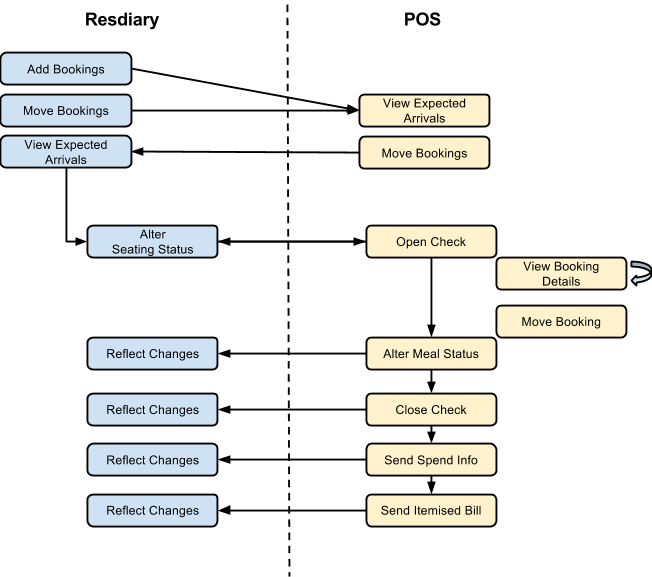
Our experience has shown that users expect a bi-directional user flow. Thus ResDiary now expect the bi-directional seating flow after which the epos system controls the ResDiary booking.
Note: Any integrations that do not support a bi-directional user flow will not be certified for production use with any clients.
Viable Product Feature Set
The viable product feature set is intended to allow an integration to go live with confidence that the functional set covers all ResDiary restaurants basic expectations.
POS must create a table mapping for the current day that reflects the ResDiary table setup.
INTEGRATION must support at bidirectional ‘seating’ of guests-bookings and adding of ‘walk ins’ and reflect the results in both systems.
INTEGRATION must support opening checks and reflect the result against a booking-table(s) in ResDiary.
POS user must be able to open a check and: a. Be informed that the table is due to be used by a booked guest b. Create a ResDiary walk in, on a single or joined table with: i. Defined booking duration (for best results use 0 which uses RsDiary defined durations) ii. Override the natural capacity of a table and the result be reflected in ResDiary
POS must update a ‘walk in’ booking as per any other booking.
POS must import the list of bookings (Expected Arrivals) for the current day-service
BOOKING DETAILS must include: a. Table number b. Party size c. Promotion: Title (Name) + Quantity booked d. Deposits Information (paid / processed) e. Booking Comments f. Special Requests (aka Booking Cods) g. Channel information h. Booking extras (name) + (quantity) i. Booking Reason
GUEST DETAILS must include: a. Guest First and Surname b. Customer comments c. Customer Codes (Interests) d. VIP Status e. Customer Type f. Company g. Birthday h. Anniversary
POS user must be able view an individual guest-bookings detail at any time.
POS user must be able to move checks and the booking move be reflected in ResDiary.
INTEGRATION must support configurable ‘meal status’ communication a. Meal status flags must conform to list used in ResDiary. b. Meal status updates must be communicated as per configuration settings.
POS user must be able to ‘pay’ a checks and the ‘close’ result be reflected against the ResDiary booking.
INTEGRATION must send total spend data for each individual booking upon closure.
INTEGRATION must automatically apply paid deposits to a check when
paying a check.INTEGRATION must add the receipt to the booking upon closure of a check.
Implementation Specific Decisions
We respect that each POS provider will have their own agenda and design team that may want to consider further data points available in the API.
Technical Requirements
All integrations must use TLS 1.2 or above for data encryption.
Acceptance Testing and Certification
The POS provider must:
Provide access to a test environment where the POS system is accessible and integrated against the ResDiary test environment.
Agree a mutually accessible means of feedback.
Agree to action critical feedback.
ResDiary will provide:
Implementation design advice via our Product Management Team
A support email address ([email protected]) to our EPOS API specialist during development to assist the development team.
Assist in the selection of a trial client
Assist in the feedback process
Certify the product for general release as and when the above criteria are met.
ResDiary will not:
Enable any integrations that have not met the minimum requirements stated above
Support any restaurant clients found to be enabled where the integration has not been certified.
Support any POS provider with any issue where the integration has not been certified.
Last updated
Was this helpful?